

Accessing Multiple porting
- Click [+] in the right corener
- Click [Numbers]
- Click [Port existing number].
- Click [Multiple porting].
- Go throug Multiple porting flow к странице добавления пользователей.
- Click [Uload CSV]
CSV Porting Flow
On the first page, the user can download a CSV template.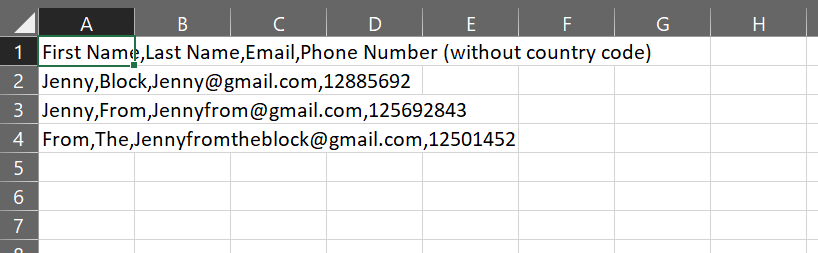 Next, the user can upload their CSV with the correct information.
If everything is done correctly, one or more people are ported.
If something is done incorrectly, the user is redirected to a page with a message that their CSV cannot be read.
If the user mistakenly enters the email of a user who already has a phone number, this user gets a yellow title and a message that he already has a number and will be ignored during porting.
Next, the user can upload their CSV with the correct information.
If everything is done correctly, one or more people are ported.
If something is done incorrectly, the user is redirected to a page with a message that their CSV cannot be read.
If the user mistakenly enters the email of a user who already has a phone number, this user gets a yellow title and a message that he already has a number and will be ignored during porting.
What does CSV consist of?
- First and last name
- Valid unique email address
- Phone number without country code
- The file is not split by cells in Excel (everything is written in the first one)
- The file must not contain spaces and special characters other than commas (,)
- Each value must be separated by commas instead of spaces